
Thank you! Your submission has been received!
Oops! Something went wrong while submitting the form.
January 21, 2026
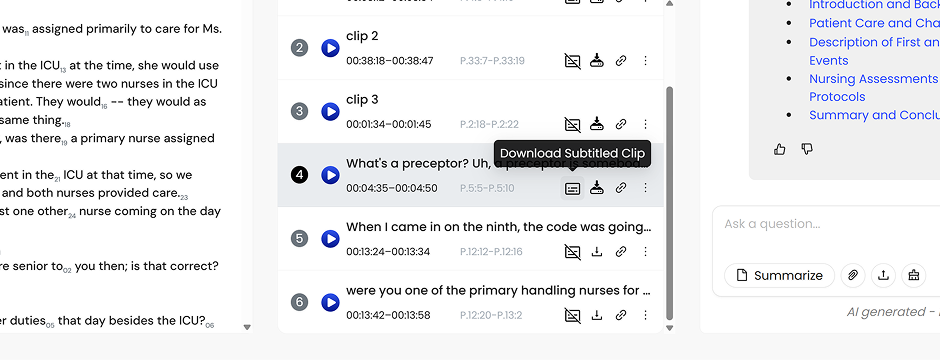
You can now generate and download subtitled video clips directly from your final transcript in Skribe.
If you’ve ever tried to show a deposition clip in court only to hit a dead Wi-Fi zone, or watched a key moment fall flat because the audio wasn’t perfectly clear, you’re not alone. When it matters most, you don’t want to be troubleshooting.
Whether you’re preparing for trial or building a discovery package, having the video and the words locked together gives you one less thing to worry about.
Let’s say you’ve been working from a rough transcript. Once the final, proofread version is ready in Skribe, any clip you’ve already created (yes, even full playlists) can be turned into a subtitled download.
That includes:
The subtitles come only from the final, human-proofed transcript. What appears on screen is exactly what you’re relying on. No guesswork. No last-minute surprises.
Once generated, your subtitled clips are ready to download and use outside the platform. They work wherever you need them: courtrooms, conference rooms, or anywhere internet access can’t be taken for granted.
Creating a subtitled clip is straightforward:
Note: Longer clips and playlists take longer to process. Most are ready in a few minutes.
Subtitled clips and playlists are available as downloads. You can still share standard clips through Skribe with on-screen text for easy viewing.
Whether you’re preparing for court, organizing discovery, or sharing key moments with your team, downloadable subtitled clips give you more flexibility without adding extra steps, costs, or tools.
When you press play, everything should just work. And the confidence that comes from knowing it will is hard to overstate.
–
We make it easy to start with Skribe with your own media files: Try it for Free.
Schedule a Demo and experience Skribe in action with a complimentary, no-obligation session tailored to your specific needs.
You may also be interested in: Skribe FAQ
