
Thank you! Your submission has been received!
Oops! Something went wrong while submitting the form.
February 4, 2026
When you’re taking or reviewing a deposition, there’s always a quiet thought in the back of your mind:
“Is there something important I’m missing?”
Maybe it’s buried in a police report. A medical record. A prior deposition. A demand letter you drafted weeks ago. Those details matter, but they’re scattered across PDFs, tabs, and windows. And no one wants to stop mid-prep to hunt for them.
Now, you don’t have to.
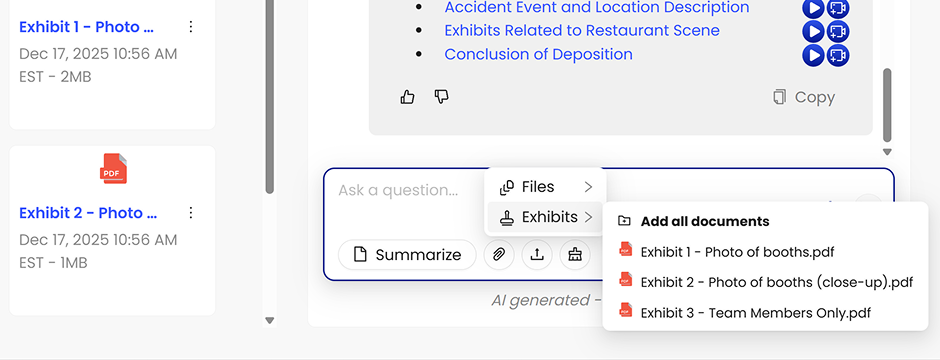
With Skribe’s new Include File to Chat feature, you can upload a PDF directly into your session. Skribe reads it alongside the deposition transcript. Then it uses both when answering your questions. No copying. No flipping between windows. No relying on memory.
Inside Skribe’s AI Chat and transcript tools, you’ll see a new Upload file option.
Just drag in a PDF. That file becomes part of the context for that session.
When you ask a question, Skribe looks at:
Then it gives you a clear, grounded answer. It even includes reference links back to the source so you can see exactly where it came from.
You don’t need to explain the document. You don’t need to copy-paste anything. Skribe reads it the way you would.
Catch contradictions instantly
“Did this witness say something that conflicts with the prior depo?”
Upload the earlier transcript and ask. Skribe flags inconsistencies without you going line by line.
See whether testimony matches the records
“Does her story line up with the medical report?”
Drop in the PDF and ask directly. No window switching. No guesswork.
Clarify timelines without guessing
“Did their symptoms start before or after the ER visit?”
If those dates live in different documents, Skribe cross-references them for you.
Use your deposition outline mid-session
Upload your outline and ask:
Draft with the full picture in mind
Upload a prior demand letter or brief and ask:
“Can you help draft a summary that reflects these themes?”
Now your drafting reflects everything, not just what you remember.
Most legal teams already have these documents open when reviewing depositions. This just lets you stop switching tabs and start asking better questions.
The result:
And if you’re already using Skribe’s AI Chat, Realtime, or Final Transcripts, there’s no learning curve. Just upload the file and keep working.
We’ll expand this over time.
Skribe is built for litigators who want to move faster without cutting corners. Adding file upload to AI chat is one more way to help you stay in control and avoid missing what matters.
Log in and try it out. If you’re not sure where to start, use the files you already trust most: outlines, medical records, prior depositions, reports, and letters.
–
We make it easy to start with Skribe with your own media files: Try it for Free.
Schedule a Demo and experience Skribe in action with a complimentary, no-obligation session tailored to your specific needs.
You may also be interested in: Skribe FAQ
